
AI Photo Editor: Photo Enhance
Amobear Application - AILABS.Beauty
3.921.00 Reviews
- Version
- v1.0.3_20261008
- Installs
- 1.00M
- Age Rating
- Everyone
Screenshots
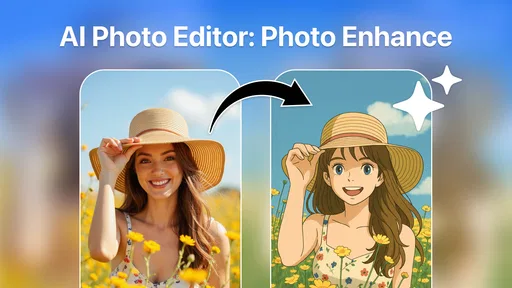
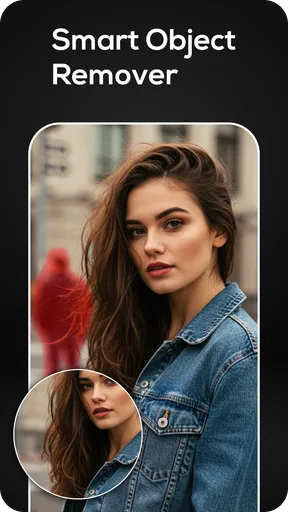
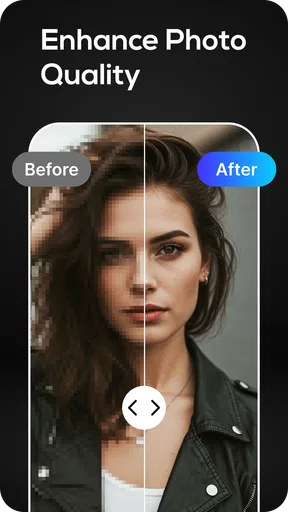

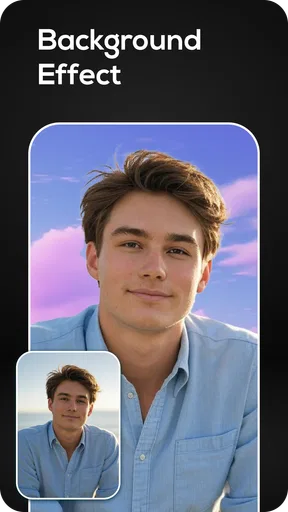
Our Review of AI Photo Editor: Photo Enhance
 Analysis by Appyee
I often end up editing photos on a phone that someone else in the household may also use, so I value tools that make a quick, understandable job of a single picture. AI Photo Editor: Photo Enhance is aimed at that sort of task: improving image quality and removing unwanted objects rather than replacing a full desktop editing setup. I’d treat it as a handy option for everyday fixes, while keeping expectations sensible about what automated editing can do.
A quick fix when a photo is shared
Imagine taking a family picture in a busy room and noticing a distracting item in the background just before you send it to relatives. An object-removal tool can be useful in that moment, just as enhancement can help when an image looks soft or lacks detail. The practical benefit is speed: you can try a correction on the phone instead of moving the photo to a more involved editor.
That convenience matters when a device is passed around. One person might want to clean up a snapshot, while another only wants to crop or brighten a picture. The app is in the beauty and photo-editing space, but its appeal is less about elaborate styling than about making ordinary photos look more presentable with a few approachable edits.
Keep edits intentional on a shared device
On a shared phone or tablet, I’d make a habit of checking which image is open before editing and reviewing the result before saving or sharing it. That is simple advice for any photo editor, but it is especially useful when several people use the same device: a quick edit can otherwise become a confusing mix of someone else’s picture and your own changes.
I would also keep original photos separate from edited versions when the image matters. Enhancement and object removal can change details, and an automated result may not preserve the exact look of the source. Keeping an untouched copy gives you an easy way back if a correction looks unnatural or removes something you meant to keep. This is a useful safeguard for family keepsakes, school pictures, or documents photographed for reference.
How it fits into a household routine
The app could suit a household that wants a low-effort way to tidy casual photos without asking one person to become the resident editing expert. A parent might improve a dim birthday snapshot, then pass the phone to someone else to choose a crop or filter. For more careful coordination, I’d agree on who is editing and who is sharing before a photo goes out; the app should not be treated as a substitute for household communication or account boundaries.
That distinction is worth keeping in mind: a shared device does not automatically mean shared preferences, shared files, or a dedicated family workflow. I would avoid assuming that one person’s edits or settings are isolated from another user’s activity. If privacy or separation is important, use the device’s own account and access controls rather than expecting a photo editor to manage them.
What to expect from its editing approach
In a crowded photo-editing category, this app’s focus on AI enhancement and removing unwanted objects is a practical angle. A standard gallery editor is usually the better choice for a quick crop, rotation, or basic light adjustment because it keeps the process simple and close to the photo itself. A more advanced editor is preferable when you need precise selections, layers, or repeatable control over a batch of images. I see this app as an in-between option: more targeted than a basic gallery tool, but not something I’d choose for detailed professional retouching.
For object removal, the background makes a real difference. A small item against a plain wall is a more reasonable test than a person crossing a detailed pattern or a busy scene. After an automatic edit, zoom in and inspect the edges and nearby textures; a result that looks convincing at thumbnail size may show smudging when viewed closely. If the edit is for a treasured photo or a client-facing image, I’d compare it with the original and consider a manual editor before deciding it is ready.
Small choices that improve the result
Start with the least destructive adjustment. If a photo is merely a little soft, try enhancement before applying several filters or making multiple corrections. Each added treatment can push colors and textures farther from what the camera captured. I’d also avoid judging a portrait only by its sharpness: aggressive enhancement may emphasize skin texture or create an overly processed look, so the best result is often the one that still feels natural.
For an unwanted object, make the selection as carefully as the tool allows and check what sits immediately behind it. Removing a simple object near the edge of the frame is a more forgiving use case than erasing something that overlaps hair, hands, lettering, or a distinctive background. If the first attempt leaves a visible mark, I’d undo it and try a narrower correction rather than repeatedly painting over the same area.
Who will get the most from it
I’d recommend trying it if you regularly want to rescue a slightly disappointing phone photo, tidy a distracting background element, or make a quick edit before sharing. It is also approachable for someone who does not want to learn a complex editing workflow just to improve a handful of everyday pictures. The developer is AMOBEAR TECHNOLOGY GROUP, and the app is free to install, so it is easy to consider as a casual tool rather than a commitment to a professional editing routine.
I’d skip it if you need exact control over every retouch, dependable restoration of badly damaged images, or a carefully repeatable look across a large collection. In those cases, a manual editor gives you more control, while a built-in gallery editor may be enough for straightforward crops and brightness changes. AI can provide a useful first pass, but it cannot know whether a detail is meaningful to you or whether a polished-looking result is faithful to the moment.
Age, trust, and paid choices
The app is rated for everyone, which makes it broadly suitable for general audiences, but I’d still guide younger users on what to edit and where to share the finished image. Photo editing can change context as well as appearance; removing an object from a picture may be harmless fun, but altering a photo that represents a real event can mislead people. A quick conversation about keeping originals and asking before posting is more useful than assuming an age label settles every household question.
It has a 4.1 average from around 2.7 thousand ratings and has been installed over a million times. Those figures suggest that many people have tried it, but they do not guarantee that every enhancement will suit a particular photo. The app first appeared on December 5, 2024, and its current version is 0.0.4.3_03112025; it requires Android 8.0 or later. It is free to use as an install, with in-app purchases listed from $5.99 to $49.99 per item, so I’d check the purchase details on the screen before confirming anything, especially on a device used by more than one person.
First impressions
The moment you open AI Photo Editor: Photo Enhance, you're greeted with a clean and intuitive interface. No clutter, just straightforward options that make navigation a breeze. It feels like the app is saying, "Hey, let's make some magic with your photos!"
Easy-to-use Features
One of the things that immediately caught my attention was how user-friendly everything is. Whether you're a photo editing newbie or a seasoned pro, you'll find the tools accessible and easy to understand. The app offers a variety of features, from basic edits like cropping and adjusting brightness to more advanced ones, such as AI-powered enhancements.
The AI enhancements are where the app truly shines. With a tap, you can enhance images in ways that seem almost magical. The AI analyzes the photo and applies adjustments that bring out details you didn't even know were there. It’s like finding hidden treasure in your photos!
Standout Tools
Let's talk about some of the standout tools. First, there's the AI Enhance tool. This feature is designed to automatically refine and enhance your photos. It’s perfect for those moments when you want to give your images a quick uplift without diving into manual adjustments.
Then there's the Color Correction tool. Ever taken a photo that turned out a bit dull or off-color? This tool fixes that with ease, adjusting the colors to make your photo pop. It’s like putting on a pair of glasses for the first time and seeing everything in HD.
"It’s like having an entire editing team working behind the scenes to make your photos look their best."
Creative Possibilities
Beyond basic enhancements, AI Photo Editor: Photo Enhance offers creative tools that allow you to express your artistic side. There are filters galore, each transforming your photos with unique styles. From vintage vibes to modern aesthetics, the app has a filter for every mood.
Personally, I’m a sucker for the Vintage Filter. It gives photos an old-school charm that’s hard to resist. And let’s not forget the Blur Tool, perfect for adding depth and focus to your images. Want to make your subject stand out? This tool has got your back.
Sharing and Saving
Once you’ve crafted the perfect image, sharing it is a breeze. The app integrates seamlessly with social media platforms, allowing you to post directly from the app. Plus, it offers multiple saving options, ensuring your photos retain their quality.
And if you’re someone who loves keeping things organized, you’ll appreciate the app’s ability to save projects, letting you revisit and tweak them anytime. It’s like having a digital scrapbook at your fingertips.
Final Thoughts
Overall, AI Photo Editor: Photo Enhance is a fantastic tool for anyone looking to elevate their photo editing game. Its blend of simplicity and power makes it suitable for all skill levels. Whether you’re polishing up your holiday snaps or crafting a perfect shot for Instagram, this app is your go-to companion.
In a world where visuals are everything, having a tool like this in your arsenal can make all the difference. So, next time you’re looking to enhance your photos, give it a try and watch your images come to life!
My household verdict
For a household that shares a device, I’d treat this as a convenient editing option, not a shared photo-management system. Its appeal is the chance to make a quick improvement without a steep learning curve; its limits are the familiar ones of automated editing, shared-device mix-ups, and the need to review purchases and edits carefully. I’d try it on an ordinary snapshot first, compare the result with the original, and keep a separate copy of any image that matters. If that small test suits your needs, it can earn a place in a casual photo routine; if you need precise retouching or strong separation between different users, choose a more controlled workflow instead.
Privacy and Permissions
See what permissions an app requests and how it handles your data.
- Photos/Media/Files
- read the contents of your USB storage, modify or delete the contents of your USB storage
- Storage
- read the contents of your USB storage, modify or delete the contents of your USB storage
- Wi-Fi connection information
- view Wi-Fi connections
- Other
- view network connections, full network access, draw over other apps, control vibration, prevent device from sleeping, Google Play license check, read Google service configuration
Verdict
Strengths of AI Photo Editor: Photo Enhance
- User-friendly interface for quick edits.
- Advanced AI boosts photo quality.
- Wide range of filters available.
- Supports high-resolution exports.
- Batch processing saves time.
Limitations of AI Photo Editor: Photo Enhance
- Occasional ads disrupt workflow.
- Limited features in free version.
- Requires internet for AI functions.
- Can drain battery quickly.
- Some filters seem repetitive.
Similar Picks in This Category
View All
Beauty Makeup Editor & Camera
Photo & Video Editors - Instant Solution4.7

Perfect365: Face Makeup Editor
Perfect365, Inc.3.5

Mirror Plus - HD Mirror app
Digitalchemy, LLC4.8

Cute Lock Screen & Wallpapers
Prometheus Interactive LLC4.6

HD Camera for Android
One Music Player4.5

Phone Mirror app - True Mirror
Cards4.6
Frequently Asked Questions
What features does the AI Photo Editor: Photo Enhance offer?
AI Photo Editor: Photo Enhance offers a range of features, including automatic photo enhancement, background removal, and advanced color correction. It also provides filters, effects, and retouching tools to enhance selfies and portraits. The AI-driven technology ensures quick and efficient edits, making it easy for both beginners and professionals to improve their photos.
Is AI Photo Editor: Photo Enhance easy to use for beginners?
Yes, AI Photo Editor: Photo Enhance is designed with user-friendliness in mind. The intuitive interface and automated features make it accessible for beginners. Users can quickly apply enhancements with just a few taps, while more advanced users can delve into manual adjustments for fine-tuning their images.
Does the app require an internet connection to function?
While many features of AI Photo Editor: Photo Enhance work offline, certain functionalities such as cloud-based storage and some AI-driven enhancements may require an internet connection. This ensures access to the latest tools and updates, allowing users to benefit from the full range of editing capabilities.
Are there any in-app purchases or subscription fees?
AI Photo Editor: Photo Enhance offers a free version with basic features. However, for access to premium tools and effects, users may need to make in-app purchases or subscribe to a monthly or annual plan. This model allows users to choose a package that best fits their editing needs and budget.
Is my data safe with AI Photo Editor: Photo Enhance?
The app prioritizes user privacy and data security. Photos and edits are stored locally on the device unless users choose to upload them to the cloud. The app complies with privacy regulations, ensuring that personal information and images are protected against unauthorized access.
